
FMCSA census download: open the file in Excel
The official FMCSA Company Census is free to download, but the full file exceeds Excel’s worksheet row limit. Compare the original CSV, database and filtered-download options below. If you need a smaller spreadsheet, choose a state and fleet size to preview it first.
Free official census download · Compare the Excel and database options
Preview 25 rows free. Larger CSVs $1.99 USD. No account needed.
Choose a starting list, registered physical state and fleet size for a smaller CSV for Excel. US states, DC and Puerto Rico. Reported classifications and cargo can overlap; this is not an operating-authority or insurance check. No phone numbers or emails.
Official download and Excel optionsSpreadsheet exampleBuild a carrier list by state and fleet size
FMCSA census download options for Excel
The official FMCSA Company Census File is free to download. The complete file exceeds Excel’s 1,048,576-row worksheet limit. Opening the CSV directly cannot put every census record on one worksheet.
Choose how to handle the national file
- Use the original census: get the free CSV from the official page. Import it into a database when you need the full population or fields outside DataScoop’s public schema.
- Process or split it yourself: filter the original records before loading a worksheet, or split the file into smaller parts while retaining the header. A CSV export does not remove Excel’s worksheet limit.
- Download a prepared subset: DataScoop keeps active registrations and applies your state, city and fleet filters before download. Preview the columns and missing values free; a larger matching CSV is paid.
If a prepared subset fits your task, these editable examples are useful starting points:
- Texas carriers with 21–100 power units. Start with a state and fleet-size band, then narrow by city or cargo.
- California carriers carrying general freight. Cargo is a reported category, not proof of a current route or available capacity.
- Carriers based in Chicago, Illinois. State and city describe the registered physical address, not the territory served.
From census records to a usable spreadsheet
- Open a list above and adjust its filters. Check the matching-row count and recorded import date.
- Download the free sample of up to 25 rows. Check the business names, USDOT numbers, physical addresses, power units and driver counts before paying.
- When the sample matches your task, use the list builder to buy the complete filtered CSV at the displayed price. A single export needs no account.
- In Excel, choose Data → From Text/CSV. Use UTF-8 and comma-separated fields; keep USDOT, MC and ZIP identifiers as text so Excel preserves their formatting.
- Keep the filtered result below Excel’s 1,048,576-row worksheet limit, allowing one row for the CSV header. Add a state, city or fleet filter if the list is still too large.
Review the FMCSA dataset’s CSV sample, full column list and latest import date. DataScoop’s default copy contains active registrations. An active registration does not establish current operating authority, insurance or safety; verify a carrier in the relevant FMCSA system before using it for a contracting decision. Phone numbers, emails and officer names are excluded.
Build a carrier shortlist
Use a dated Texas sample to check fleet and location filters, then try the assistant prompt or API code. Open the worked example.
Example: general-freight carriers in Laredo, Texas
This list selects active registrations with a physical address in Laredo, Texas, interstate operations and 21–100 power units. Their reported classification includes Authorized For Hire and their cargo includes General Freight.
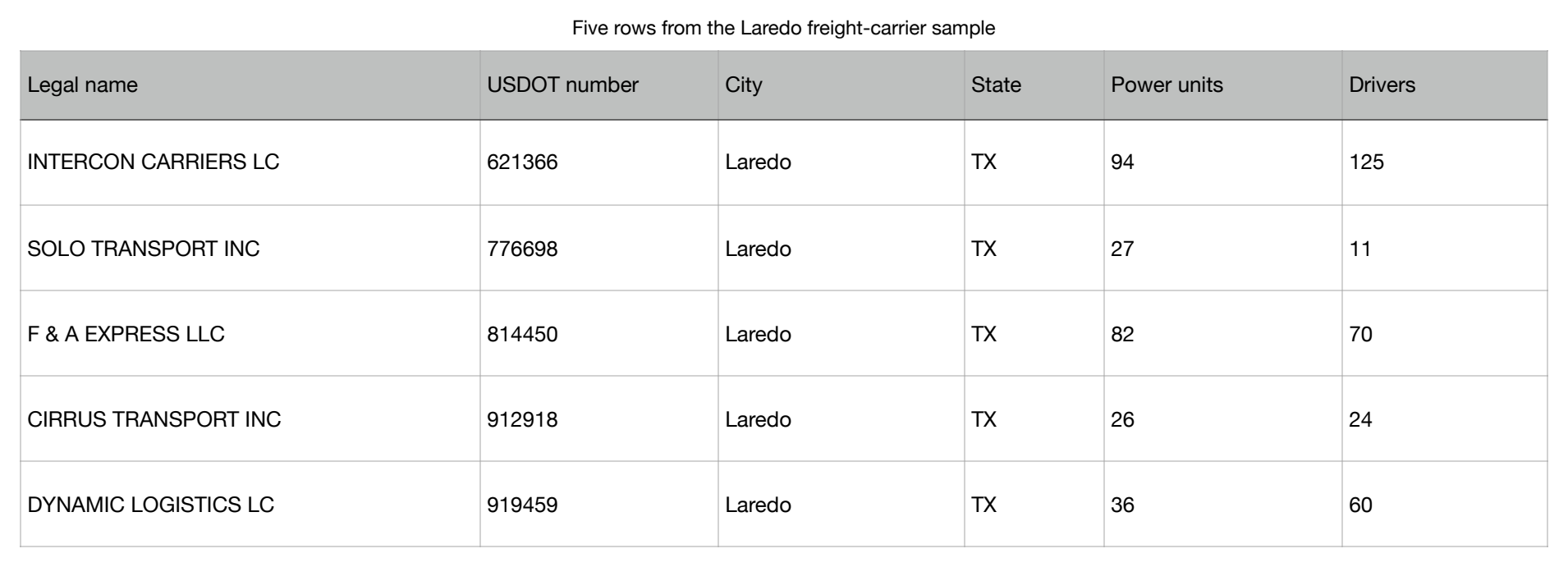
Read the five example rows
| Legal name | USDOT number | City | State | Power units | Drivers |
|---|---|---|---|---|---|
| INTERCON CARRIERS LC | 621366 | Laredo | TX | 94 | 125 |
| SOLO TRANSPORT INC | 776698 | Laredo | TX | 27 | 11 |
| F & A EXPRESS LLC | 814450 | Laredo | TX | 82 | 70 |
| CIRRUS TRANSPORT INC | 912918 | Laredo | TX | 26 | 24 |
| DYNAMIC LOGISTICS LC | 919459 | Laredo | TX | 36 | 60 |
Download these five rows and six columns free to try the spreadsheet. The live preview includes up to 25 rows and all 32 public columns; its records and count may change after a new import. Blank source values stay blank.
Download the five-row examplePreview this list with current data
These are the first matching rows, in import order. A carrier can report several classifications and cargo categories; these filters do not establish current operating authority or territory served. Phone numbers and emails are excluded.
Source: FMCSA Company Census File, a US federal public record. Verify an individual carrier in the current FMCSA record before relying on its registration details.
What is happening
The active-carrier census has more than twice Excel's 1,048,576-row worksheet limit. Opening the national file can leave you with an incomplete sheet before you have selected a state or fleet size.
The official file is free. If you only need carriers in one area, filtering before download gives you a smaller list to work with.
What it disrupts
- Excel cannot place the complete active-carrier population on one worksheet.
- A list by state, city, fleet size, classification or cargo becomes a database import or portal-query project.
- Broker and carrier teams fall back to private spreadsheets or gated monitoring products to keep searchable carrier lists.
Why it happens
- FMCSA publishes a national census for public reuse, not a spreadsheet-sized list for one commercial question.
- The file includes millions of active, inactive and pending entities and a wide operational schema.
- The official data is not real-time and can differ from other FMCSA systems that refresh on another schedule.
Checks to make now
- Decide whether you need active carriers only, and whether physical-location state or city is the right geography.
- Write down the smallest useful fleet, operation, classification, cargo, hazmat, safety-rating and registration-date filters.
- For a carrier-vetting or safety decision, verify the individual USDOT record in the relevant current FMCSA system before acting.
Where DataScoop fits
DataScoop maintains an active-carrier copy of the FMCSA Company Census. The current catalog contains 2,243,795 records and was last imported on 2026-10-31.
Filter by state, city, ZIP, operation, fleet size, power units, drivers, classification, cargo, hazmat status, safety rating or registration date. Preview 25 rows free, then the explorer shows the enabled one-off export price for your currency.
Where it fits, and where it does not
Good fit
- Researching carrier markets and building lists of registered businesses using public registration facts.
- Developers and agents that need the same filterable census through CSV, REST API or MCP.
Not the right fit
- Real-time authority, insurance or enforcement decisions; check the current FMCSA record for an individual carrier.
- Phone numbers, email addresses, officer names, personal contact enrichment or a full carrier-vetting product.
Proof and boundaries
DataScoop's default ingest keeps active carriers. The official census also contains inactive and pending entities that are outside this default slice.
FMCSA says the Company Census is updated from a 24-hour-old database and is not real-time. DataScoop also depends on its own displayed import date.
Phone, fax, cell, email, officer and mailing-address fields are deliberately not mapped. Some registered carrier names are sole-proprietor names and are reproduced only as the official business registration.
The census contains self-reported fields such as equipment, drivers and mileage. Verify the live carrier record before a safety, compliance or contracting decision.
Check the sample, column list and import date before buying. The free preview has the same public columns as the full filtered CSV.
Questions people ask
Can the full active-carrier census open in Excel?
Not on one worksheet. The active population exceeds Excel's fixed 1,048,576-row worksheet limit. A database, file splitting or filtering before download are the practical options.
Is this official FMCSA data?
Yes. DataScoop ingests the FMCSA Company Census from the US DOT open-data portal and keeps the source attribution and import date with the result.
Is it real-time?
No. FMCSA states that the Company Census is sourced from a 24-hour-old database and is not real-time. DataScoop has an additional import timestamp. Check the current FMCSA record when freshness is critical.
Does the export include phone numbers, emails or officers?
No. DataScoop deliberately carries company-level operational fields and excludes personal contact and officer fields.
Can I use it to approve a carrier?
It can support research, but it is not a complete vetting decision. Authority, insurance, safety and registration facts can change, so verify the individual carrier in the appropriate current FMCSA system.
Filter the census before it reaches Excel
Choose a state, fleet band or cargo type and inspect 25 matching carriers free before downloading the full slice.
Choose a state and preview carriers