
Download a restaurant list for Excel
Choose a council and business type to build a restaurant, café or takeaway list. Preview the records free, then download a CSV for Excel. This guide covers England, Wales and Northern Ireland.
Preview 25 rows free. Larger CSVs £1.99 GBP. Pay once. No account needed.
England, Wales and Northern Ireland. Available council areas and business types follow the FSA’s classifications. DataScoop import: . Scotland uses a separate scheme.
Spreadsheet exampleFree source or filtered CSV?Dataset and fields
Example: restaurants, cafés and canteens in Leeds
Select Leeds as the council and Restaurant/Cafe/Canteen as the business type. The FSA groups these three types together. The council area includes places beyond Leeds city centre, such as Morley and Wetherby.
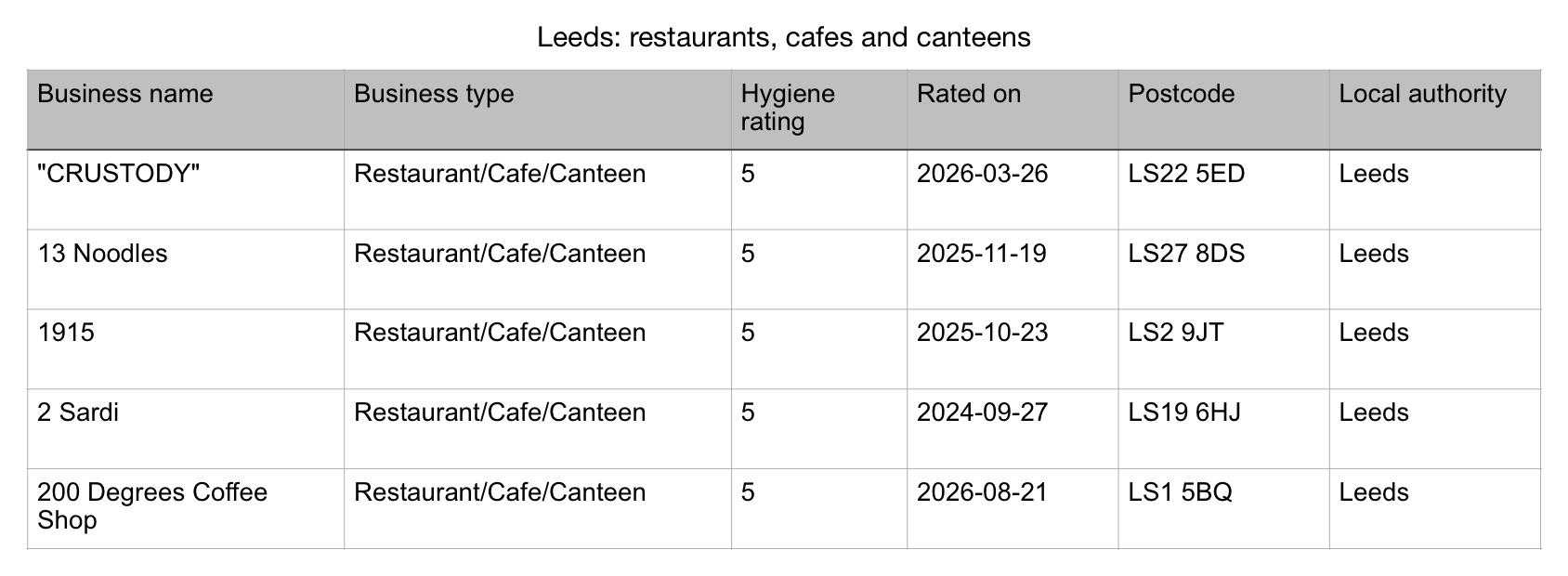
Read the five example rows
| Business name | Business type | Hygiene rating | Rated on | Postcode | Local authority |
|---|---|---|---|---|---|
| "CRUSTODY" | Restaurant/Cafe/Canteen | 5 | 2026-03-26 | LS22 5ED | Leeds |
| 13 Noodles | Restaurant/Cafe/Canteen | 5 | 2025-11-19 | LS27 8DS | Leeds |
| 1915 | Restaurant/Cafe/Canteen | 5 | 2025-10-23 | LS2 9JT | Leeds |
| 2 Sardi | Restaurant/Cafe/Canteen | 5 | 2024-09-27 | LS19 6HJ | Leeds |
| 200 Degrees Coffee Shop | Restaurant/Cafe/Canteen | 5 | 2026-08-21 | LS1 5BQ | Leeds |
Download these five rows and six columns free to try the spreadsheet. Your filtered preview contains up to 25 rows and all 11 columns, including address details and coordinates where supplied.
Download the five-row examplePreview this Leeds list
These were the first five matching preview rows at capture. They do not represent every rating or business in the area. The current preview can differ after a new import; a business’s rating date is separate from the import date.
Source: Food Standards Agency. Contains public sector information licensed under the Open Government Licence v3.0. DataScoop is independent of the FSA.
Build a restaurant list for Excel
- Choose a council and business type.Use the selector above. Start with restaurants, cafés and canteens, or choose takeaways or pubs. You can add a rating or postcode-prefix filter in the list builder.
- Check the matching rows.Review the total and import date, then download up to 25 matching rows free. The Leeds spreadsheet example shows the file layout; it is a fixed example, not today’s whole list.
- Open the CSV in your spreadsheet.In Excel, use Data → From Text/CSV, select UTF-8 and comma-separated fields, and keep Postcode as text. In Google Sheets, use File → Import → Upload. Sort the whole table so business names stay with their addresses and ratings.
- Download the full list when it fits your task.A result of 25 rows or fewer fits in the free download. A larger filtered CSV costs £1.99, paid once. Save the original file with its chosen filters and import date before editing a copy.
What is in the restaurant CSV?
The file has 11 columns from the FSA register. It contains business records and hygiene information, with no phone numbers, emails, websites, menus or opening hours.
| Column | What it means |
|---|---|
| Business name | The published establishment name. Names can be shared or change; this export does not contain an FSA identifier. |
| Business type | The FSA category. Restaurant/Cafe/Canteen can include workplace or institutional canteens; a restaurant classified as a pub or hotel is outside that selection. |
| Hygiene rating | A 0–5 hygiene rating or a source status such as AwaitingInspection or Exempt. These statuses and blanks are not zero ratings. This is not a customer-review score. |
| Rated on | The source rating date, separate from the DataScoop import date. It does not tell you when the business opened. |
| Address line 1, Address line 2 and Town | Address details where published. A private address can be withheld at source. Keep blank cells blank. |
| Postcode and Local authority | The published postcode and council area. A council selection is not a county or a search radius; keep postcodes as text in your spreadsheet. |
| Latitude and Longitude | Coordinates where supplied. Missing coordinates do not mean the business is at 0,0. |
Scroll the table sideways on a small screen. The final CSV line beginning with # credits the source; leave it out of record counts and calculations.
Use the free FSA file or download a filtered list
The FSA already provides the national data free. DataScoop’s paid option prepares the records matching your chosen filters as a CSV.
| Option | Cost | What you get |
|---|---|---|
| Official FSA downloads | Free | A complete daily CSV, council XML files, downloadable search results in XML or JSON, and an API that needs no registration. Choose this route if you want to work directly with the source. |
| Leeds worked example | Free | Five saved restaurant, café and canteen records, with the example’s import date. Try the file in your spreadsheet. |
| Your filtered preview | Free | Up to 25 matching rows with all 11 columns. If the result fits within that limit, this is the complete list. |
| Larger filtered CSV | £1.99, once | All matching records in the current DataScoop import. No account or subscription needed. |
Coverage and dates
This guide uses the Food Hygiene Rating Scheme records for England, Wales and Northern Ireland. Scotland uses the Food Hygiene Information Scheme and is available in the separate Scottish dataset. Its inspection results should not be treated as 0–5 ratings.
The list reflects the last successful DataScoop import. The FSA and councils control publication; a recent import does not mean every business was recently inspected. Source duplicates, renamed businesses or closed premises can remain in the data. Check a particular business on the FSA ratings website when its latest status matters.
Source: Food Standards Agency, reused under the Open Government Licence v3.0. DataScoop is independent of the FSA. See the dataset page for its current import date, filters and API access.
Research restaurants in an area
See a dated Leeds sample, the fields available and ways to query the same selection in an assistant or an app. Open the worked example.
Questions people ask
Is this every restaurant in the UK?
No. This guide uses FSA scheme records for England, Wales and Northern Ireland. Scotland has a separate DataScoop dataset. Restaurant/Cafe/Canteen includes all three business types; restaurants classified as pubs or hotels are outside that selection. Records reflect the saved import, not a verified list of currently trading businesses.
Can I download the official data free?
Yes. The FSA provides a complete daily CSV, local-authority XML files, downloadable search results and a free API. DataScoop offers a smaller filtered CSV: preview up to 25 rows free, then pay once for a larger matching list.
Can I select just takeaways or pubs?
Yes. Choose Takeaway/sandwich shop or Pub/bar/nightclub in the selector. The council and business type match the source values exactly. You can add a rating or postcode-prefix filter in the list builder.
Does it include emails, phone numbers or websites?
No. The 11-column CSV contains names, business types, hygiene ratings, rating dates, address details, postcodes, local authorities and coordinates where published. DataScoop does not add contact enrichment.
What does the import date tell me?
It records when DataScoop last successfully imported the source. Each record has a separate rating date where supplied. The FSA and councils control publication; check the FSA website for a particular business’s latest status.
Choose the businesses you need
Start with a council and a business type. Check the matching rows and free sample before buying the full CSV.
Choose a council and type