
Entered your list
Example home A
- Reviewed baseline
- Outside this selection
- Latest check
- 45 registered beds
Choose an England care-home list for territory planning or recruitment research. Preview the records before buying a filtered CSV for Excel.
Preview 25 rows free. Larger lists £1.99. Pay once.
Surrey · 393Devon · 309Hampshire · 483
England only. Areas follow CQC's local-authority field and can differ from county boundaries. Imported . This is when DataScoop loaded the source, not when every record changed.
Try Surrey homes with 40+ registered beds
Preview care homes across England
For suppliers of equipment, training or software, choose an area, then narrow by registered beds or care type. Check the CSV columns and their limits before using the list for account research. See how to refresh the same territory list.
Compare locations, registered providers and field coverage for supplier territory planning or recruitment research.
Observed ; both areas use DataScoop's CQC import. Snapshot.
| Measure | Surrey | Hampshire |
|---|---|---|
| Care-home locations | 393 | 483 |
| Registered provider IDs | 222 | 285 |
| Recorded beds | 15,305 | 15,888 |
| With a valid bed count | 393 / 393100.0% | 483 / 483100.0% |
| With a published phone | 386 / 39398.2% | 472 / 48397.7% |
| With a published website | 253 / 39364.4% | 318 / 48365.8% |
| With a standard overall rating | 226 / 39357.5% | 292 / 48360.5% |
| Locations in top five providers | 69 / 39317.6% | 95 / 48319.7% |
Hampshire has 90 more locations (22.9%), but only 583 more recorded beds (3.8%). Start with locations for site-based research; use recorded beds for a separate capacity comparison. Neither figure establishes spend, staffing needs or vacancies.
One row is a location. Inspect provider groups in the free territory report. For nursing-only research, select Nursing homes under Service types, then a relevant specialism. Includes residential and nursing homes; service types can overlap.
Preview Surrey care homesPreview Hampshire care homes
Check up to 25 matching rows free; a list within that limit is entirely free. A larger filtered CSV costs £1.99 once for the filtering and file preparation. CQC's source data is free. Preview counts can change after later imports.
Free comparison CSV · Data and method JSON · Plain-text methodology
Source: Care Quality Commission (CQC), Open Government Licence v3.0. DataScoop is independent of CQC.
Selection: Care home = true, exact Local authority in England. Hampshire excludes separately recorded Southampton and Portsmouth. Locations use distinct Location IDs; providers use populated Provider IDs, not verified ultimate owners. The five-largest-provider share divides their combined locations by all selected locations.
Beds sum valid nonnegative whole numbers; missing or invalid values are excluded. All 876 locations here have positive bed values. Recorded beds are not occupied or staffed beds. Phone and website coverage counts nonblank, unverified business details. Standard ratings are Outstanding, Good, Requires improvement or Inadequate; missing ratings do not imply poor quality. Percentages use locations and round to one decimal. CQC publication can lag; import dates do not establish each record's freshness.
These counts cover all 14,871 care-home locations across England in the source import dated . Counts include corrections in the served revision dated . They cover the whole list before any service-type or specialism filters.
Email addresses and registered-manager names are not included. Phone numbers and websites are published business details where supplied. Blank fields stay blank.
A shared provider phone number or website can appear on several locations. A filled field does not confirm that a contact detail still works. Ratings count the four standard CQC overall ratings; an unrecorded rating is not a judgement of care quality. A recorded bed count can be zero and does not show vacancies or staffed capacity.
The import date is when DataScoop loaded the source, not when every record was updated. CQC is the source; check the official profile for a location's latest details.
Choose the CQC register, set Care home: Yes, Local authority: Devon and Service type: Nursing homes. This gives you a focused list to open in Excel or Google Sheets.
| Name | Provider | Primary service type | Postcode | Overall rating | Latest check |
|---|---|---|---|---|---|
| Spring House | BRAND Elysium Healthcare | Nursing homes | EX2 4PD | Requires improvement | 2022-08-16 |
| The Harry Care Home | Not provided | Nursing homes | EX39 1JD | Not provided | Not provided |
| Pinewood Residential Home | Not provided | Nursing homes | EX9 6JP | Requires improvement | 2019-08-07 |
| Woodhayes | Not provided | Nursing homes | EX2 4LR | Good | Not provided |
| Park Lane Care Home | Not provided | Nursing homes | EX32 9AL | Good | 2018-12-05 |
The table shows 6 selected columns. The free CSV includes all 35 public columns for these first 5 rows. Blank source values stay blank in the CSV. These are the first matching records in the import, not recommendations or a ranking of care quality.
Source: Care Quality Commission. DataScoop import: 2026-10-24. Rows can change after a new import.
Download 5 example rows freeBuild this list with your own filters
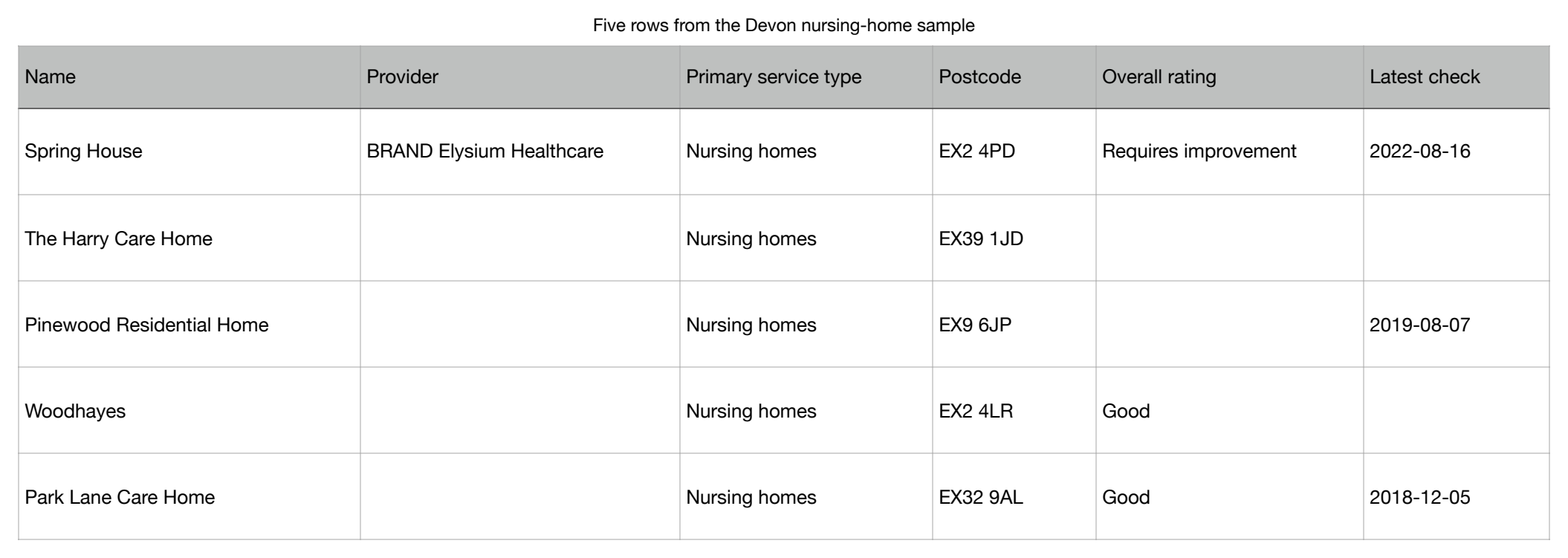
Source: Care Quality Commission. Contains public sector information licensed under the Open Government Licence v3.0. DataScoop is independent of CQC. Download these five rows and six columns.
If you sell equipment, training, software or other services to care homes, start with the registered locations that fit your territory. For example, preview Surrey care homes with at least 40 registered beds, then adjust the area, care type or specialism in the list builder.
This is organisational data for account research, without named decision-maker emails or vacancy information. Published phones and websites may be missing. Use the same Surrey selection in an AI assistant or API workflow.
This example shows a selection of care homes with at least 40 registered beds in a chosen local authority. The three homes and changes below are invented to explain the feature. They are not CQC records, actual changes or a forecast.
Entered your list
Left your list
Details changed
Entered and left mean membership of your filtered selection. They are not proof that a home opened or closed. A check uses the latest available DataScoop import, which may be the same import as before.
Your latest captured list becomes the baseline for the next comparison. Opening the report or checking again does not mark it reviewed. You choose when to accept the displayed changes.
Tracking starts with your first successful capture. It cannot reconstruct changes from before you saved the territory. Source import dates are shown separately from record dates, and missing source values stay missing.
Try your own selection free, then save it with annual access for £9.99 for 12 months. Annual access has no automatic renewal. Save up to 10 territories, each with up to 5,000 locations. Existing Pro access also includes this feature. Checks run only when requested; no scheduled checks or notification emails.
For supplier territory planning or recruitment research, compare registered locations, provider counts and recorded beds in two authorities. Choose the care type, specialism or minimum beds that fit your task, inspect the matching providers and preview the actual locations free.
Open the free territory report with Surrey selected. Every report shows its DataScoop import date and missing-field coverage. Registered capacity is not a count of occupied or vacant beds; provider IDs identify registered operators, not verified ultimate owners.
Each row is a registered location. A provider with ten homes can appear in ten rows. These are the fields most useful when building or checking your spreadsheet; the CQC dataset page has the full column list.
| Column | How to use it |
|---|---|
| CQC Location ID and Name | Identify the registered location. Use the Location ID to compare locations across files; names can change or be shared by different homes. |
| CQC Provider ID and Provider | Identify the organisation running the service. One provider can run several locations. Group by populated Provider IDs when counting providers, and keep records with a missing ID separate. |
| Care home, Service types and Primary service type | Keep Care home set to Yes for residential and nursing homes. A location can have more than one service type; Primary service type is only the first one listed. |
| Local authority, County and Postcode | Describe the registered location's address. The area selector uses Local authority, which can differ from county boundaries. Keep these fields as supplied when comparing areas. |
| Overall rating | The published rating where available in the import. A blank means no rating was supplied in this import; check the CQC profile if you need the latest rating. |
| Latest check | A check or inspection date where supplied. It is separate from the rating publication date and the DataScoop import date; the export has no separate rating publication date. |
| Beds | The registered bed count where published. It does not show vacancies or staffed capacity. Leave missing counts blank rather than treating them as zero. |
| Phone, Website and CQC profile URL | Published business details where available, plus the source profile link. Use the CQC profile to check a particular home's latest record. Not every record has a phone number or website. |
On a small screen, scroll the table sideways. Blank source values stay blank in the CSV. The final line beginning with # credits the source; keep it out of counts and calculations.
CQC makes its source data available free. Choose the original files if you want to do the filtering yourself, or check a DataScoop sample before buying a larger filtered list.
We completed a real retrieval on 1 November 2026: care-home locations in the exact Surrey local authority with at least 40 recorded beds. Each route produced a UTF-8 CSV containing Location ID, name, beds, local authority, postcode, overall rating/status and website. IDs were preserved as text and blank values stayed blank.
This saved measurement predates the ratings supplement published later on 1 November 2026. The original files and counts below are retained; check the current preview and its source dates for corrected coverage.
On a small screen, scroll the table sideways to compare both routes. Keyboard users can focus the table and use the arrow keys.
careHome=true, localAuthorityExact=Surrey and minBeds=40 with strict filter validation.The measured DataScoop route used free API pagination, with no account or payment. It did not measure the browser’s paid CSV download or checkout. In the browser, preview this exact list and choose the existing sample or full-download offer.
187 Location IDs appear in both outputs; 1 appears only in the official selection and 1 only in DataScoop’s selection. Names, bed counts, local authorities, postcodes and websites match across the shared locations. Rating/status labels differ for 58 shared locations, including 57 where the official file has a label and DataScoop’s value is blank.
The official workbook provides more rating/status labels for this measured selection. Use it when that coverage matters. These snapshots have different dates; the differences do not establish errors, openings, closures or verified rating changes. A DataScoop import date is not a publisher release date or the date each record was checked.
It records actual files, filters, transfer sizes, matching IDs and field coverage. Both CSVs were checked using prepared Python code. We did not measure a person’s Excel preparation time or typical customer effort. Machine load affected the technical timings, so we make no time-saving claim.
Download the aggregate evidence (JSON) · Read the measurement method · Download the reproducible Python script. A rerun uses the then-current sources and may return different results. The script selects organisational fields only; it does not output manager names or personal contact fields.
Contains public sector information licensed under the Open Government Licence v3.0. Source: Care Quality Commission (CQC). DataScoop is independent of CQC. Open Government Licence v3.0.
This guide covers CQC-registered locations in England. The wider register also includes homecare agencies, dentists, GPs and other services, so keep the care-home filter on when you need residential or nursing homes. Scotland, Wales and Northern Ireland have separate regulators and are not included.
The CSV contains organisational register fields and published business details. Manager names and personal email lists are excluded. CQC controls when its records are published; the DataScoop import date does not make each record current to that day. Use the CQC profile URL in the CSV to check a home’s latest status or inspection before a time-sensitive decision.
The CQC data imported on 2026-09-25 contains 14,931 care-home locations. 14,928 have a positive bed count, totalling 489,957 recorded beds. These are source registration figures, not beds currently vacant or staffed.
For suppliers and researchers sizing a territory, these are the ten local authorities with the most care-home locations in this snapshot. Counts describe locations, not provider organisations.
| Local authority | Care homes | Homes with a bed count | Recorded beds |
|---|---|---|---|
| Kent | 503 | 503 | 15,924 |
| Hampshire | 483 | 483 | 15,879 |
| Lancashire | 424 | 424 | 13,645 |
| Essex | 408 | 408 | 13,328 |
| Surrey | 392 | 392 | 15,288 |
| West Sussex | 342 | 342 | 11,062 |
| Norfolk | 318 | 318 | 10,304 |
| Devon | 309 | 309 | 8,640 |
| East Sussex | 301 | 301 | 9,259 |
| Lincolnshire | 284 | 284 | 9,180 |
Download the full local-authority capacity table free (CSV). It preserves all 153 authority groups as recorded by the source. Links above open today’s matching records; those can differ from this fixed snapshot.
For individual locations behind these totals, review the CQC care-provider dataset, CSV columns and current sample, then filter by local authority or service type.
9,543 of 14,931 care-home locations have one of the four standard overall ratings; 5,366 have a blank overall-rating field. A missing rating in this import does not mean CQC has never rated the service.
| Rating or status | Locations |
|---|---|
| Good | 7,823 |
| Not recorded | 5,366 |
| Requires improvement | 1,223 |
| Outstanding | 483 |
| Inspected but not rated | 14 |
| Inadequate | 14 |
| Insufficient evidence to rate | 7 |
| No published rating | 1 |
Source: Care Quality Commission data. Contains public sector information licensed under the Open Government Licence v3.0. DataScoop is independent of CQC.
We select records flagged as care homes, group by the recorded local authority, count locations and sum positive bed counts. 3 locations have no positive bed count; we do not treat them as zero-capacity homes. Blank authority and rating fields are labelled “Not recorded”; other rating statuses remain distinct. The full provider register has 57,133 locations and includes other service types.
Import: 2026-09-25; analysis: 2026-09-26. The import date is not the date each rating was issued. These figures are a description of source records, not care-quality advice. Verify an individual service’s latest record with CQC.
Download the aggregate evidence (JSON) · Read the reproducible calculation · Build a current care-home list
Preview Surrey care homes with at least 40 registered beds, then repeat the same selection with an assistant prompt or working API example. Open the worked example.
No. DataScoop serves the organisational register and deliberately excludes personal contact lists. The current fields include location and provider names, service types, public business addresses, published phone numbers and websites.
No. It covers locations on the CQC register in England. Scotland, Wales and Northern Ireland have separate regulators that DataScoop does not currently carry.
The page shows the current DataScoop import date. DataScoop inherits any delay in CQC's own publishing, so check the live CQC profile when a decision depends on one home's latest status.
Yes, from the CQC Syndication API: the published overall rating, the five key-question ratings and the number of beds, where available. A missing overall rating means it is not available in our import. The latest check or inspection date is included where supplied; this is not a rating publication date. The export does not include a separate rating publication date.
Start with the area and service type. Preview the records free before deciding whether the full list is useful.
Choose an area